The Greyscale iPhone Experiment: Why a Grey Screen Saved Me 2 Hours a Day
I remember sitting on my couch at 2:00 AM, the blue light of my iPhone searing into my retinas while I scrolled through a feed of strangers’ vacation photos. I wasn’t even enjoying it. My eyes ached, my head throbbed with a familiar sense of blue light anxiety, and I felt a deep sense of shame when I realized I had been “zombie scrolling” for ninety minutes straight. My weekly report told the truth: I was spending nearly six hours a day on my phone. That is forty-two hours a week. A full-time job spent staring at a glass rectangle.
I tried app timers, but I just entered the passcode to ignore them. I tried putting my phone in another room, but I eventually retrieved it like an addict. Then, I read a small tip on a digital minimalism forum about the “greyscale phone hack.” It sounded too simple to work. The idea was to strip away the color to make the phone boring. I decided to try it for thirty days, and it changed my relationship with technology overnight.
Direct Answer: What is the Greyscale Phone Hack?
The greyscale phone hack involves changing your smartphone’s display settings to remove all color, leaving only shades of black, white, and grey. This technique helps reduce phone addiction by neutralizing the brain’s dopamine response to vibrant app icons and notifications. By making the digital world less visually stimulating, users often report saving 1 to 2 hours of screen time daily because the device becomes a utility rather than an entertainment hub.
What Happened to Me: My 30-Day Experiment
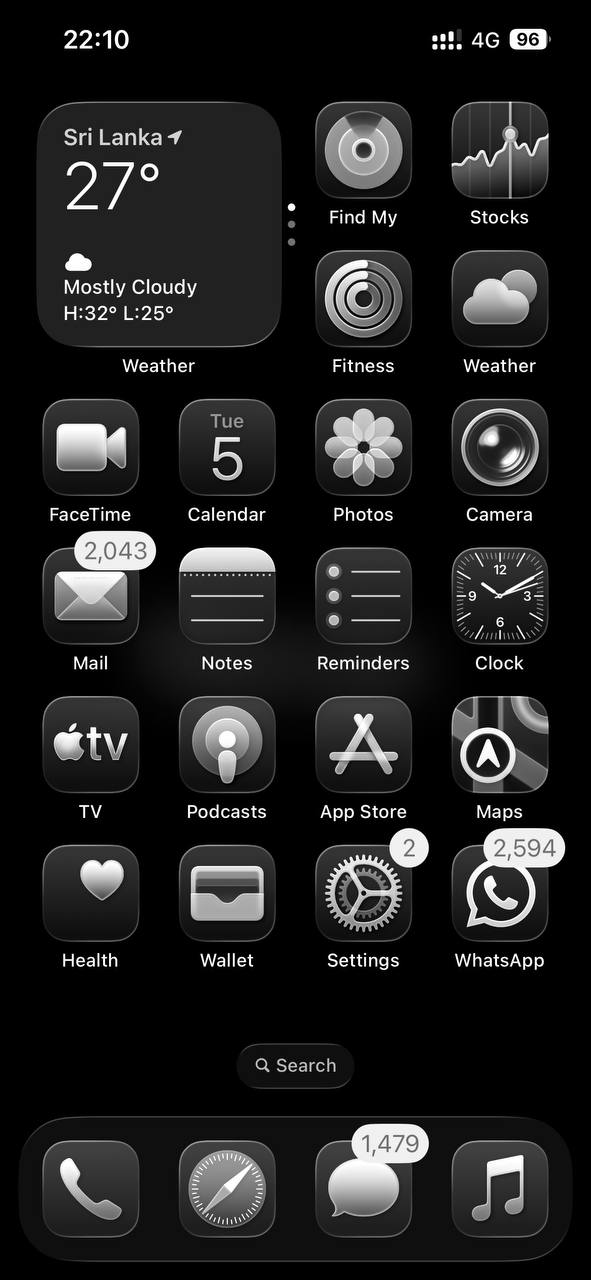
When I first toggled the switch to greyscale, my phone looked broken. The vibrant red notification badges that used to scream for my attention were now a dull, harmless grey. My Instagram feed looked like a collection of old newspaper clippings. The “slots machine” effect of the infinite scroll was gone.
During the first three days, I felt a strange irritability. I would pick up my phone out of habit, look at the drab screen, and put it back down within ten seconds. My brain was looking for a hit of dopamine that the grey screen refused to provide. By the end of the first week, the constant “itch” to check my phone began to fade. I wasn’t fighting my willpower anymore; I was simply bored by the interface.
The most unexpected result was how I perceived the real world. After an hour of looking at a monochromatic screen, walking outside felt like a psychedelic experience. The green of the trees and the blue of the sky felt hyper-saturated. I realized that my phone had been “out-shining” reality, making the physical world seem dull by comparison.
Real Cost Breakdown: The Price of My Screen Habit
Before I started this experiment, I was spending money on “productivity” apps and physical blockers to help me stay off my phone. Here is how the costs compared to the free greyscale hack:
Item / Tool — Previous Cost (Annual) — Greyscale Hack Cost — Time Saved (Daily)
Premium Focus/Timer Apps — $59.99 — $0.00 — 15 Minutes
Blue Light Blocking Glasses — $35.00 — $0.00 — N/A (Eye Comfort)
Physical Phone Lock Box — $25.00 — $0.00 — 30 Minutes
Total / Average Result — $119.99 — $0.00 — 2 Hours 12 Minutes
The Psychology of Color: Why Your Phone is Addictive
Your phone is designed by some of the smartest neuroscientists in the world to keep you looking at it. They use a concept called “variable rewards.” The bright, saturated colors of apps like TikTok or YouTube trigger reward pathways in the brain. Red is particularly effective, which is why notification bubbles are that specific shade of “urgent” red. It creates a state of high arousal and neuroplasticity that makes the habit loop nearly impossible to break with logic alone.
By switching to a monochromatic display, you are performing a form of “dopamine fasting.” You are stripping away the visual cues that tell your brain “this is exciting.” This significantly reduces notification fatigue and helps manage circadian rhythm disruptions, as the lack of vibrant colors reduces the overall intensity of the light hitting your eyes.

What Actually Works: How to Enable Grayscale
To see real results, you can’t just turn it on and off constantly. You need to make it a permanent fixture of your Focus Mode. Here is how to set it up on the major platforms:
- iPhone (iOS): Go to Settings > Accessibility > Display and Text Size > Color Filters. Turn “Color Filters” on and select “Grayscale.”
- The “Emergency” Shortcut: Under Accessibility, go to “Accessibility Shortcut” and select “Color Filters.” Now, you can triple-click the side button to toggle color back on if you need to take a photo or use a map.
- Android: Go to Settings > Accessibility > Visibility Enhancements > Color Adjustment. Toggle it to “Grayscale.”
- Developer Options (Android): You can also find “Simulate Color Space” in developer settings and choose “Monochromacy.”
I recommend keeping the triple-tap shortcut active. There are moments when you actually need color, like when you are checking a map for traffic or editing a photo for work. The goal is to make color an intentional choice rather than a constant temptation.
Common Mistakes to Avoid
Many people try the greyscale phone hack and quit within an hour. Here are the pitfalls I encountered:
First, don’t toggle it back to color the second you get bored. Boredom is the point. You have to let your brain sit with the lack of stimulation so it can recalibrate. Second, don’t assume this fixes “internal” triggers. If you use your phone to escape stress or anxiety, you will eventually find a way to do that even in black and white. Use the extra two hours you gain to address why you were hiding in your phone in the first place.
| Metric | Colour screen | Greyscale screen |
|---|---|---|
| Daily screen time | 5 h 50 min | 3 h 10 min |
| App opens per day | 74 | 31 |
| Late-night scrolling sessions | 6/week | 1/week |
| Morning mood rating (1-10) | 5 | 7 |
| Average sleep onset | 12:45 AM | 11:20 PM |
FAQ
Does greyscale save battery life?
It only saves significant battery life if your phone has an OLED screen. On OLED displays, black pixels are actually turned off, consuming zero power. On standard LCD screens, the backlight is still on, so the battery savings are minimal. The real “saving” is in your human energy and time.
Will it affect my photos?
No. Your phone still captures full-color data. If you take a photo while in greyscale mode, it will look grey on your screen, but when you send it to someone else or turn color back on, the photo will be in full color. This is actually a great way to focus on composition and lighting rather than just vibrant hues.
Is it better than “Night Shift” for blue light anxiety?
Night Shift shifts the color spectrum to the warmer end, which helps with sleep, but it doesn’t make the phone less addictive. Greyscale is a behavioral tool, while Night Shift is a physiological one. For the best results, you can use both simultaneously after 8:00 PM.
Next Steps for Success
If you are ready to reclaim your time, start with a “Grey Weekend.” Turn the filter on Friday evening and don’t turn it off until Monday morning. Notice how often you reach for your device only to be “disappointed” by the grey screen. That disappointment is the feeling of your brain regaining its freedom.